
Recently, I had a request come through to create an events calendar component. This component requested by a client needed to display the three nearest upcoming events.
Nearest events were defined as either events that had not yet occurred, but were one of the next few to happen, or any events that were currently on going (multi-day events that had started, but not yet ended, for example).
Sounds pretty simple huh? Indeed conceptually it was quite easy, however this client was using Sitecore Search as their search platform, and this component would be making use of the indexed data from it. As someone who is pretty new to Sitecore Search, I decided to do some digging to figure out how exactly I would implement this.
I took a look at the Sitecore Search search filters documentation page and discovered that it supports complex filtering, which allows you to nest filtering options in a way that best supports what you’re trying to do.
In essence, complex filtering support allowed me to create a filter to retrieve events that occurred after today’s date, as well as events that had already started, but had not yet ended. After a bit of trial and error, I came up with the following search query:
{
   "context":{
      "page":{
         "uri":"/search"
      }
   },
   "widget":{
      "items":[
         {
            "entity":"content",
            "rfk_id":"[YOUR RFK_ID]",
            "search":{
               "content":{

               },
               "limit":3,
               "sort":{
                  "choices":false,
                  "value":[
                     {
                        "name":"date_asc"
                     }
                  ]
               },
               "filter":{
                  "type":"and",
                  "filters":[
                     {
                        "name":"content_type",
                        "type":"eq",
                        "value":"Event"
                     },
                     {
                        "type":"or",
                        "filters":[
                           {
                              "type":"and",
                              "filters":[
                                 {
                                    "name":"end_date",
                                    "type":"gt",
                                    "value":"2024-09-09T10:27:13"
                                 },
                                 {
                                    "name":"start_date",
                                    "type":"lt",
                                    "value":"2024-09-09T10:27:13"
                                 }
                              ]
                           },
                           {
                              "name":"start_date",
                              "type":"gt",
                              "value":"2024-09-09T10:27:13"
                           }
                        ]
                     }
                  ]
               }
            }
         }
      ]
   }
}
A few things to note:
- content_type is a field we use to determine an item’s, well, content type. In this case, we’re filtering down to only Events.
- start_date is a datetime field on Event items. These are filtered against the current date time (2024/09/09, aka today’s date).
- end_date is similar to start_date, but represents the end date for the event.
The filtering here may seem daunting at first, but it’s quite simple when you break it down.
- Take only Events
- content_type = Event
AND
- Only take events that confine to the appropriate date filters
- Take only events that have already started, but have not yet ended
- start_date less than today
- end_date greater than today
- Take only events that have already started, but have not yet ended
- OR
- Take only events that have not started at all.
- start_date greater than today.
- Take only events that have not started at all.
After you understand the logic of the filtering, all that’s left is to return the number of results you want (in my case it was 3) and sort them. I sorted mine by date lowest to highest, indicating whatever event was next up (or currently ongoing) would appear first.
I ran this JSON through Sitecore Search’s API Explorer tool (which you can find in the Search app on Sitecore Cloud) and was able to successfully retrieve my results! You can also use the API Explorer to build queries directly, which is neat.
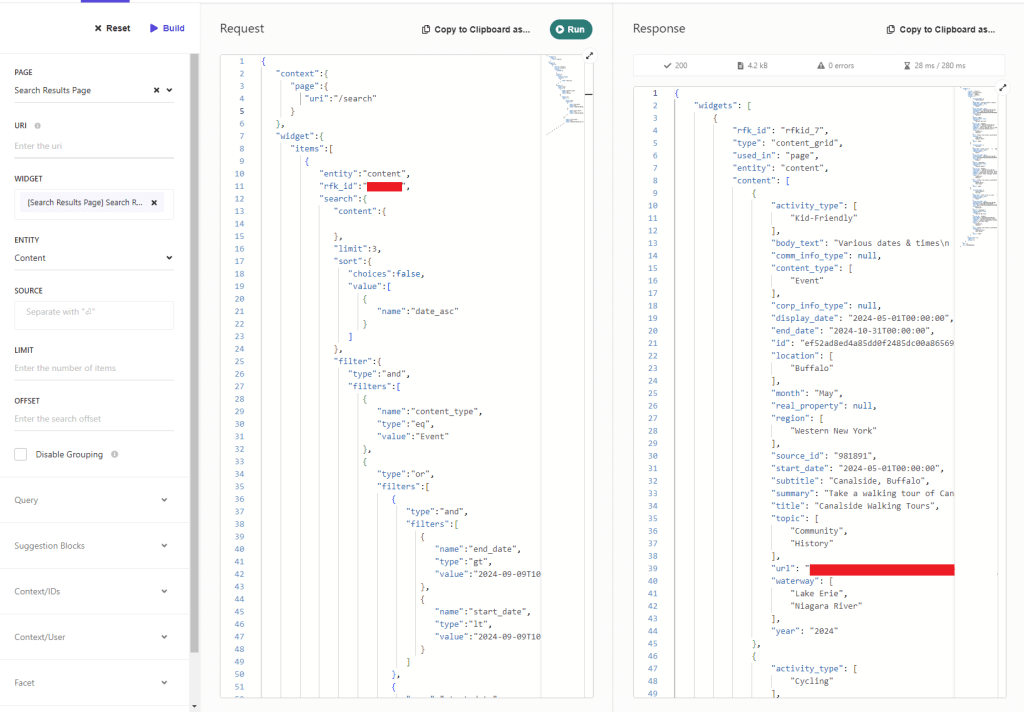
You can also run your request through tools such as Postman, and you should retrieve the same result.
All that was left was to implement this request into my component, setting the date arguments automatically using the current date time and mapping the returned data to our models (we’re using .NET Core for this application).
You can get pretty detailed with the available filtering options in Sitecore Search. Thankfully, this one was quite simple to put together, but the options are endless here. I’m looking forward to the next time I get to put together an even more complex query!
Happy Sitecoring!


Leave a Reply