

Recently, I’ve been developing a multisite XM Cloud solution that hosts 15+ regional language websites. As part of this work, many configurations needed setting. These configurations ensured all of the websites work together. These included setting new environment variables for all of the regional site URLs.
While making these configuration changes, I noticed that our XM Cloud deployments started to fail. They succeeded in building but failed to deploy. For this project, I did not have direct access to the XM Cloud Deploy App. Instead, I only had access to deployment-related information through the Sitecore Cloud CLI.
The logs/errors I started to see was:
- Build has completed successfully.
- Starting deployment of environment ‘Dev’
- Deployment ‘deploymentId‘ of environment ‘Dev’ has failed
- If the problem persists, contact customer support, and provide them the session tracing ID of ‘sessionTracingId‘.
- Deployment status : Failed
Deployment last failure message : Failure releasing deployment
This error message does not provide us with much information. So, I checked the logs to see if there was anything I was missing. Unfortunately, the logs didn’t show any further error messages, so I wasn’t quite sure what was going on.
I wasn’t making much headway. I decided to reach out to Sitecore Support. I wanted to see if they had any ideas as to what was going on.
The Sitecore Support folks quickly noticed an issue I had overlooked. I had some duplicated environment variables within the XM Cloud project. It turns out that you can have more than one environment variable with the same name in XM Cloud if they have different targets.
An environment variable target in XM Cloud is what determines what the environment variable should apply to. A target can be set to “CM”, a rendering host name, or “ALL”. The latter applies to everything, including both CM and one or many rendering hosts.
In my project, I had originally created some environment variables using the target CM. Because I did not have direct access to XM Cloud Deploy App, I added these in using the Sitecore cloud CLI, by using the following variable upsert command:
dotnet sitecore cloud environment variable upsert --environment-id env1 --name testvar --value testval --target CMThis was a mistake, as I needed the target to be the rendering host, not CM. In the XM Cloud Deploy App, you can simply switch the target of an environment variable by selecting a different value from the drop down:
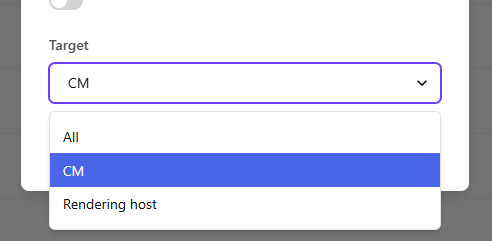
However, since I was using the Sitecore cloud CLI, I re-ran the variable upsert command, but with the correct target (ALL)
dotnet sitecore cloud environment variable upsert –environment-id env1 –name testvar –value testval –target ALL
According to the documentation, “The variable upsert subcommand creates or updates environment variables for an XM Cloud environment.” But this is only true if the target does not change.
If you run the variable upsert command for an existing environment variable with a different target, it will create a second environment variable. This new variable will have the same name. The new variable will have the same name. Of course, when you try to build against this, deployment will start to fail. Sitecore does not know what to do with the extra environment variables.
Once I knew of my mistake, I removed the duplicated environment variables. These were the ones with the “CM” target. Then, I re-ran the deployment, which ran without issue!
I researched this error. I wasn’t able to find much information online. I hope this helps someone with a similar issue!
Happy Sitecoring!
 Patt's Sitecore Blog
Leave a comment