
I was going through some components we built for an XM Cloud solution. Originally, we developed these components for editing through Experience Editor, but I was curious to see how compatible these were OOTB with XM Cloud Pages. I observed that Pages was mostly ok; our components were more-or-less editable in full without any additional customizations from what we implemented for Experience Editor. However, there was a few minor bits that weren’t totally compatible.
Without the support for edit frames in XM Cloud Pages, some of our components were lacking some editing functionality that would be critical should Experience Editor be discontinued in the future. The main issue I noticed was that components’ sub items were not sortable by default. This is something we accounted for in Experience Editor through the use of edit frames, but since those are not supported in Pages, I had to do some digging to find a solution.
I found this documentation that explains that the _HorizonDatasourceGrouping ({D0F6BE14-2A2D-4C56-ACB5-80CAA573B8E2}) template must be included as a base template of the item template used for a component in order to support sub item sorting in Pages. You can find the template here: /sitecore/templates/Foundation/Experience Accelerator/Horizon/_HorizonDatasourceGrouping. This, coupled with adding the correct insert options for your component’s sub items gives you the ability to sort these sub items directly from pages.
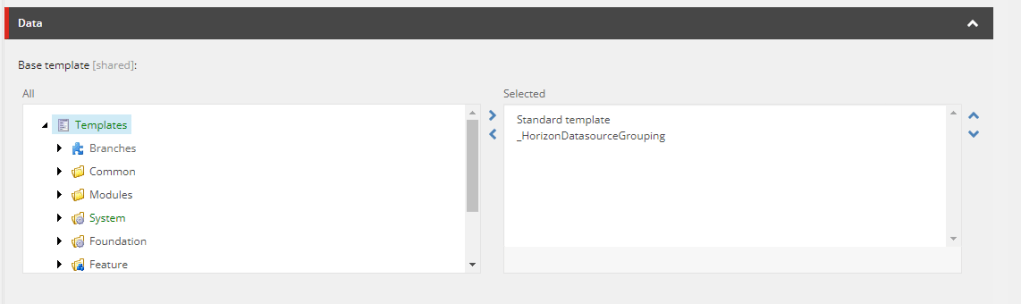
I decided to test this out on my “Hero Carousel” component. This component uses a custom”Hero Carousel” template, and has the ability to add a number of “Hero Carousel Item” template items (also custom) underneath it. By adding _HorizonDatasourceGrouping as a base template to Hero Carousel, and validating that the Hero Carousel Item template is an available insert option, I was able to properly sort items in XM Cloud Pages.
You’ll immediately see the difference as outlined in the screenshots below.


This now gives me the option to sort, rename and delete the component’s sub items easily from XM Cloud Pages!

Overall I’m happy this was such an easy change to implement, and I’ll be doing it for all of my components that require managing sub items. I’ll be digging into more XM Cloud Pages topics in future blog posts, so stay tuned!
Let me know if you have any questions in the comments below!
 Patt's Sitecore Blog
Leave a comment